Edit: I made the way the dots are displayed a lot better by adding functions and found out that I needed to do
For pos# = 0 To GridSize*(GridSpace^-1)
instead of
For pos# = 0 To GridSize
to show more dots when the GridSpace goes below 1
The grid spacing shouldn't matter whether its 1002.5125 or 2.9.
The grid size is the border and should limit how many dots are made/displayed.
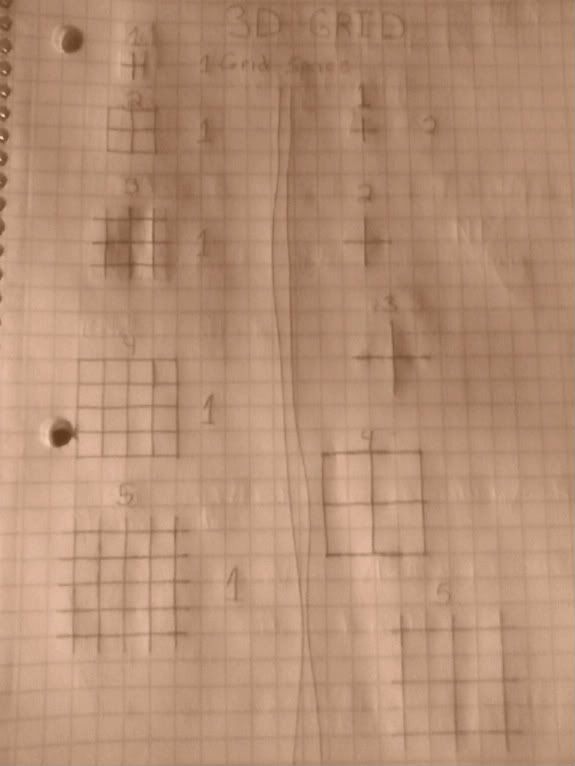
Here is what it should look like on paper (note, I made this the day BEFORE Pongo posted the idea)
The number above each grid is the grid size, the one to the right is the grid space. The grids on the the right side of the page are all a grid space of 2.
For pos# = 0 To GridSize*(GridSpace^-1)
instead of
For pos# = 0 To GridSize
to show more dots when the GridSpace goes below 1
 Open in online IDE
Global GridTexture Global GridSize#=16 Global GridSpace#=2 InitGraphics(800,600,"GIA Map Editor") GridTexture = CreateGridTexture(2+4) Global DefaultLight = CreateLight() Global cube[1] cube[0] = CreateCube() EntityTexture cube[0],GridTexture cube[1] = CreateCube() EntityTexture cube[1],GridTexture ScaleEntity cube[1],.25,.25,.25 PositionEntity cube[1],3,0,0,1 Global Camera = CreateCamera() PositionEntity Camera,0,GridSize*.5,-GridSize*1.5 CameraClsColor Camera,100,100,100 CameraRange Camera,.01,1000 RotateEntity Camera,20,0,0 Global Multiplier#=.5 Global TempPoints% While Not KeyDown(1) If KeyHit(20) GridSize = GridSize + Multiplier If KeyHit(34) GridSize = GridSize - Multiplier If KeyHit(21) GridSpace = GridSpace + Multiplier If KeyHit(35) GridSpace = GridSpace - Multiplier If GridSize < Multiplier Then GridSize = Multiplier If GridSpace < Multiplier Then GridSpace = Multiplier If KeyDown(31) TranslateEntity Camera,0,0,-.25 If KeyDown(17) TranslateEntity Camera,0,0,.25 If KeyDown(32) TranslateEntity Camera,.25,0,0 If KeyDown(30) TranslateEntity Camera,-.25,0,0 If KeyDown(18) TranslateEntity Camera,0,.25,0 If KeyDown(16) TranslateEntity Camera,0,-.25,0 If KeyDown(200) TurnEntity Camera,-4,0,0 If KeyDown(208) TurnEntity Camera,4,0,0 TempPitch# = EntityPitch(Camera) RotateEntity Camera,TempPitch,0,0 DrawWorld() TempPoints = 0 ProjectLine(0,0,0,GridSize,0,0,255,0,0) ; X Line ProjectLine(0,0,0,0,GridSize,0,0,255,0) ; Y Line ProjectLine(0,0,0,0,0,GridSize,0,0,255) ; Z Line Local TempX#[3] Local TempZ#[3] Local TempPZ#[3] Color 255,0,0 For pos# = 0 To GridSize*(GridSpace^-1) ; Instead of doing GridSize/GridSpace which freezes the program if either are 0 ; The smaller the GridSpace, the more points/dots there are TempSpacing# = GridSpace*pos If TempSpacing <= GridSize ProjectPoint(TempSpacing,0,TempSpacing,TempSpacing,255) ProjectPoint(TempSpacing,0,-TempSpacing,TempSpacing,255) ProjectPoint(-TempSpacing,0,TempSpacing,TempSpacing,255) ProjectPoint(-TempSpacing,0,-TempSpacing,TempSpacing,255) EndIf Next Color 0,255,0 Text 0,40,"Points = " + TempPoints Color 0,0,0 Text 0,80,"Center Cube depth = " + MeshDepth(cube[0]) Text 0,100,"Smaller Cube X position = " + EntityX(cube[1]) Text 0,120,"Grid Size " + GridSize Text 0,140,"Grid Space " + GridSpace Text 0,160,"Press T and G to change the Grid Size" Text 0,180,"Press Y and H to change the Grid Space" Flip Wend ClearWorld 1,1,1 End Function ProjectPoint(x#,y#,z#,value$="",point_red%=0,point_green%=0,point_blue%=0) CameraProject Camera,x,y,z If ProjectedZ() > 0 RectSize# = Sqr(EntityX(Camera,1)^2+EntityY(Camera,1)^2+EntityZ(Camera,1)^2 + x^2 + y^2 + z^2) RectSize = Cos(RectSize)*4 If RectSize > 0 TempX# = ProjectedX() TempY# = ProjectedY() Color point_red,point_green,point_blue Rect TempX,TempY,RectSize,RectSize Color 250,250,0 Text TempX,TempY,value TempPoints = TempPoints + 1 EndIf EndIf Return ProjectedZ() End Function Function ProjectLine(x1#,y1#,z1#,x2#,y2#,z2#,line_red%=0,line_green%=0,line_blue%=0) TempPivot1% = CreatePivot() PositionEntity TempPivot1,x1,y1,z1,1 TempPivot2% = CreatePivot() PositionEntity TempPivot2,x2,y2,z2,1 TempX1#=0 TempY1#=0 TempX2#=0 TempY2#=0 If EntityInView(TempPivot1,Camera) If EntityInView(TempPivot2,Camera) CameraProject Camera,x1,y1,z1 TempX1 = ProjectedX() TempY1 = ProjectedY() CameraProject Camera,x2,y2,z2 TempX2 = ProjectedX() TempY2 = ProjectedY() Color line_red,line_green,line_blue Line TempX1,TempY1,TempX2,TempY2 EndIf EndIf FreeEntity TempPivot1 FreeEntity TempPivot2 End Function Function CreateGridTexture(flags%) Local gtexture = CreateTexture(32,32,flags) SetBuffer TextureBuffer(gtexture) Color 0,0,0 Rect 0,0,32,32 Color 90,90,90 Line 16,0,16,32 Line 0,16,32,16 SetBuffer BackBuffer() Return gtexture End Function Function DrawWorld() UpdateWorld RenderWorld End Function Function InitGraphics(width = 800, height = 600,title$="Blitz3D Program",exit_message$="Are you sure?") Graphics3D width, height, 32, 2 SetBuffer BackBuffer() SeedRnd MilliSecs() AppTitle title,exit_message End Function
The grid spacing shouldn't matter whether its 1002.5125 or 2.9.
The grid size is the border and should limit how many dots are made/displayed.
Here is what it should look like on paper (note, I made this the day BEFORE Pongo posted the idea)
The number above each grid is the grid size, the one to the right is the grid space. The grids on the the right side of the page are all a grid space of 2.