I'm new to MaxGUI and would like some advice regarding data structuring of your MaxGUI programs. Below is a screenshot of a test program I've made.
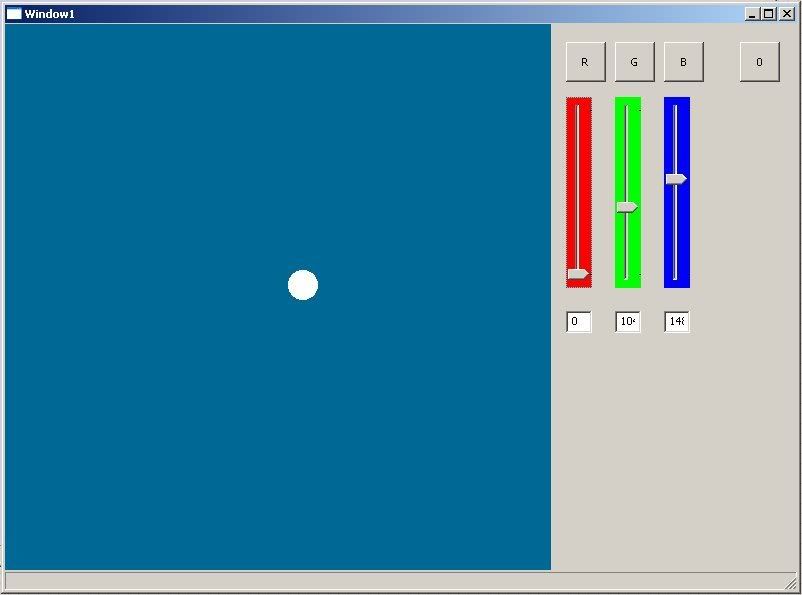
When you click one of the buttons, the canvas adjusts to the appropriate color, and the sliders and textboxes adjust to represent the appropriate values. Likewise, when you modify a slider, the canvas changes color and the corresponding textbox modifies it's value - vice versa if you input a number to the textbox.
Here's the code when I click a button:
(CCR,CCG,and CCB are all global values which the MainCanvas reads upon redraw)
What a mess! I have to manually modify every other gadget whenever I click one of them!
So what I'm looking for is a more efficient solution. How do you guys do it? I would like to 'link' the gadgets together, likely using events, so that whenever a SINGLE VALUE is changed, for example, CCR is modified, then ALL gadgets which depend upon or modify CCR will be automatically notified and updated as appropriate.
When you click one of the buttons, the canvas adjusts to the appropriate color, and the sliders and textboxes adjust to represent the appropriate values. Likewise, when you modify a slider, the canvas changes color and the corresponding textbox modifies it's value - vice versa if you input a number to the textbox.
Here's the code when I click a button:
Function Button1_GA( Button:TGadget , GadgetList:TList=Null )
	DebugLog "Button Button1 was pressed"

CCR=255
CCG=0
CCB=0

SetSliderValue(SLR,255)
SetSliderValue(SLG,0)
SetSliderValue(SLB,0)

SetGadgetText(txtR,String(255))
SetGadgetText(txtG,String(0))
SetGadgetText(txtB,String(0))

RedrawGadget(MainCanvas)


End Function
(CCR,CCG,and CCB are all global values which the MainCanvas reads upon redraw)
What a mess! I have to manually modify every other gadget whenever I click one of them!
So what I'm looking for is a more efficient solution. How do you guys do it? I would like to 'link' the gadgets together, likely using events, so that whenever a SINGLE VALUE is changed, for example, CCR is modified, then ALL gadgets which depend upon or modify CCR will be automatically notified and updated as appropriate.