Oops yes jfk I copied and pasted incorrectly. My test was in fact using flags 1+2+8+16+32.
I disabled my terrain "sides" construction but the problem is still occurring so here is the code simplified, which constructs a grid of 1x1 squares. Each corner can be of varying height.
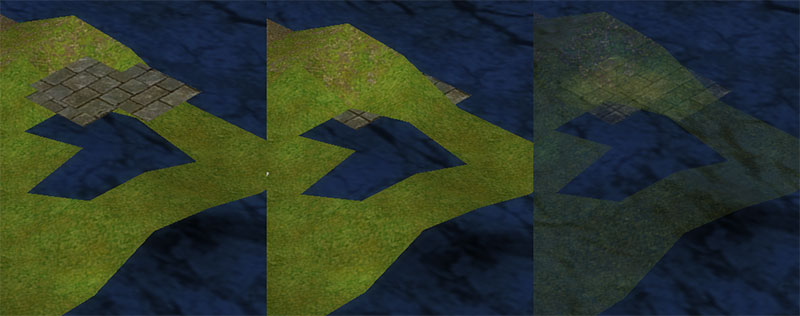
Also here's another picture showing it a bit better, with three tiles elevated (they're different heights and the perspective makes them look a bit smooshed).
Pic #1 is in "true form" with no alpha flag.
Pic #2 is with alpha flag 2 turned on my PNG texture.
Pic #3 I tried saving my PNG without transparency but still loading it with alpha flag! O_o; Is that right...
I disabled my terrain "sides" construction but the problem is still occurring so here is the code simplified, which constructs a grid of 1x1 squares. Each corner can be of varying height.
Textures(2) = LoadTexture( "tiles.png", 1+2+8+16+32 )
Global t = CreateMesh()
brush = CreateBrush()
BrushTexture brush, Textures(2), 0, 0
s1 = CreateSurface( t, brush )
size = G\MapSize
For z = 0 To size
  For x = 0 To size
    AddSquare( t, s1, x, z )
  Next
Next
UpdateNormals t
FreeBrush brush


Function AddSquare( t, s1, x%, z% )
  Local y1# = MapData(x,z,1)
  Local y2# = MapData(x,z,2)
  Local y3# = MapData(x,z,3)
  Local y4# = MapData(x,z,4)

  ;UV calculations in here

  z = 0-z
  v1 = AddVertex( s1, x,      0+y1#, z,      UVStartX, UVStartY ) ;top-left
  v2 = AddVertex( s1, x+1,    0+y2#, z,      UVStartX + UVWidth, UVStartY ) ;top-right
  v3 = AddVertex( s1, x+1,    0+y3#, z-1,    UVStartX + UVWidth, UVStartY + UVWidth ) ;bot-right
  v4 = AddVertex( s1, x,      0+y4#, z-1,    UVStartX, UVStartY + UVWidth ) ;bot-left

  t0 = AddTriangle( s1, v1,v2,v3 )
  t1 = AddTriangle( s1, v1,v3,v4 )
End function
Also here's another picture showing it a bit better, with three tiles elevated (they're different heights and the perspective makes them look a bit smooshed).
Pic #1 is in "true form" with no alpha flag.
Pic #2 is with alpha flag 2 turned on my PNG texture.
Pic #3 I tried saving my PNG without transparency but still loading it with alpha flag! O_o; Is that right...