gee thanks diablo, i thought i was annoying which is why i mentioned general tutorial.
i think ill be good once i get two things explained. i only asking so i dont have to end up doing over an interface.
i show you what I want. take a look at this picture.
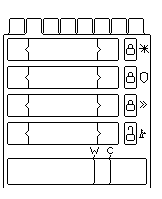
the little squares at the top are buttons. When these buttons are pressed, the display inside the box will change. So for those buttons, I use hi_button :)
what to use for the box, where all that information is explained in?
those four rectangles inside the view box, have locks to the right. the locks would be buttons. so all these things must belong to a group?
also when I click the button tabs above, to change what is displayed in the window, do i put a new window, and have how ever many windows as per button, so that when I click one, a window comes to the top? this sounds best, so that all windows are there drawn on each other, but as i click a button, a different window comes to the front.
right? :)
maybe a brief thing like a small explanation next to the features is good.
like canvases- this is a window looking object, good for use with dogs...
you get the idea... :)
i think ill be good once i get two things explained. i only asking so i dont have to end up doing over an interface.
i show you what I want. take a look at this picture.
the little squares at the top are buttons. When these buttons are pressed, the display inside the box will change. So for those buttons, I use hi_button :)
what to use for the box, where all that information is explained in?
those four rectangles inside the view box, have locks to the right. the locks would be buttons. so all these things must belong to a group?
also when I click the button tabs above, to change what is displayed in the window, do i put a new window, and have how ever many windows as per button, so that when I click one, a window comes to the top? this sounds best, so that all windows are there drawn on each other, but as i click a button, a different window comes to the front.
right? :)
maybe a brief thing like a small explanation next to the features is good.
like canvases- this is a window looking object, good for use with dogs...
you get the idea... :)